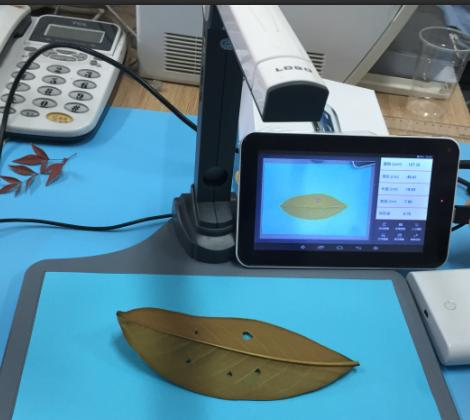
Camera type of Leaf area meter RC-80H
1.Characteristics and functions of the instrument
Intelligent Camera Leaf Area Measurement System
1. Product Overview
The intelligent camera measurement system consists of an image acquisition device and dedicated software. Using the company's proprietary area measurement algorithm accumulated over years of development, combined with leaf profile feature extraction, image geometric transformation, and edge detection technology, the system can quickly capture images and measure leaf area, perimeter, number of lesions, and other parameters.
Compared with traditional leaf area measurement methods, this system is faster and more convenient, produces more objective results, supports diverse data output, and significantly reduces errors caused by manual operation.
2. Main Technical Parameters
Measurable Parameters: Leaf area, perimeter, maximum leaf length and width, circularity, shape coefficient, number of lesions, lesion area
Applicable Scope: All types of common leaves, including intact leaves and leaves with lesions
Measurement Range: 1–600 cm²
Leaf Length: 0–297 mm
Maximum Leaf Width: 0–210 mm
Lesion Measurement Range: Not less than 0.5 cm²
Measurement Accuracy: 2% (for areas > 30 cm²), 3% (for areas < 30 cm²)
Host Storage: More than 2,000 groups
Stability: Drift within one year < ±2%
Response Time: 50 ms
Operating Conditions: Temperature -8°C to 30°C; Relative humidity 0–100%
Host Specifications:
Software System: Android 4.2.2 or above
Display: 7-inch IPS capacitive touch screen
Memory: 32 GB
Network Support: WLAN (802.11 a/b/g/n) wireless network, Bluetooth 4.0
Interface: Micro USB
Charging Power Supply: DC 5V / 1A
Battery Capacity: 3000 mAh
Dimensions: 187 × 111 × 9.3 mm
Weight: 266 g
3. Software Introduction
1) Real-time Measurement: After measuring a leaf, tap the real-time image to return to the measurement interface. At this point, you can place another leaf or perform a second measurement on the same leaf.
2) Manual Tracing: Mainly used for leaves with complex edges or complex color patterns that may cause edge detection errors. Users can manually trace the leaf margin to guide the instrument, making the measurement results more reliable. Usage: Tap "Manual," trace the leaf margin, and once the tracing is complete, tap the same position again to confirm and finish the manual assistance.
3) Parameter Calibration: Mainly used for correcting measurement accuracy. Place a leaf or color card of known area into the measurement area, obtain the measured result, enter the true area value in the parameter settings, and tap OK to save and exit.
4) Save / Open Image: Press the save button to store the measured data and image. Press the open image function to retrieve previously saved data.
5) Data Upload: Navigate to "File Management" > "Pictures" > "Leaf Area Detection" to view saved images. The corresponding measurement data is automatically sorted by time and recorded in "result.csv." You can use the pre-installed Baidu Cloud app to upload the data to a PC (a Baidu account needs to be registered separately).
Advantages: Factory price, high quality, fast delivery, custom service
MOQ: Small order acceptable
Service: OEM / ODM / Custom Logo / Custom Packaging
Get QuoteEmail: ciwt1203@gmail.com
WhatsApp: +86 17278352006
Wechat: 17278352006
Sales manager: Mr.WeiTu Chai